
 |

|
| ActiveXbox | Active Network | Announced Titles | FAQ | Forum | News| light tower |
|
|
|
ActiveXBox |
|
Xbox News |
|
DVD Compatibility Lists |
|
Inside The Xbox |
|
Xbox Released Titles |
|
Xbox 360 Released Titles |
|
Screenshots/Videos |
|
History Of The Xbox |
|
Links |
|
Forum |
|
Xbox FAQ |
|
Xbox 360 FAQ |
|
|
|
|
|
|
|
ActiveWin |
|
Articles |
|
AskAW |
|
DirectX |
|
ActiveDVD |
|
ActiveMac |
|
Forums |
|
Interviews |
|
News |
|
MS Games & Hardware |
|
Reviews |
|
Support Center |
|
Windows 2000 |
|
Windows Me |
|
Windows Vista |
|
Windows XP |
|
|
|
|
|
|
|
News Centers |
|
Windows/Microsoft |
|
Apple/Mac |
|
Hardware |
|
Xbox |
|
News Search |
|
|
|
|
|
|
|
Windows XP |
|
Introduction |
|
System Requirements |
|
Home Features |
|
Pro Features |
|
Upgrade Checklists |
|
History |
|
FAQ |
|
Links |
|
Tips |
|
|
|
|
|
|
|
FAQ's |
|
Windows Vista |
|
Windows 98/98 SE |
|
Windows 2000 |
|
Windows Me |
|
Windows "Whistler" XP |
|
Windows CE |
|
Internet Explorer 6 |
|
Internet Explorer 5 |
|
Xbox |
|
DirectX |
|
DVD's |
|
|
|
|
|
|
|
Tips & Tricks |
|
Registry Tips |
|
Windows 95/98 |
|
Windows 2000 |
|
Internet Explorer 4 |
|
Internet Explorer 5 |
|
Windows NT Tips |
|
Program Tips |
|
Easter Eggs |
|
Hardware |
|
DVD |
|
|
|
|
|
|
|
ActiveDVD |
|
DVD News |
|
DVD Forum |
|
Glossary |
|
Tips |
|
Articles |
|
Reviews |
|
News Archive |
|
Links |
|
Easter Eggs |
|
Drivers |
|
Movie Posters |
|
Top DVD Sellers |
|
|
|
|
|
|
|
|
|
Latest Reviews |
|
Xbox/Games |
|
Halo 3 |
Call of Juarez |
|
|
|
Applications |
|
Adobe Illustrator CS3 |
|
|
|
Hardware |
|
Athlon 64 X2 6000+ |
|
Acer Ferrari 5000 |
|
|
|
|
|
|
|
Site News/Info |
|
About This Site |
|
Affiliates |
|
ANet Forums |
|
Contact Us |
|
Default Home Page |
|
Link To Us |
|
Links |
|
Member Pages |
|
Site Search |
|
Awards |
|
|
|
|
|
|
|
Credits |

 DVD
EXPRESS
DVD
EXPRESS

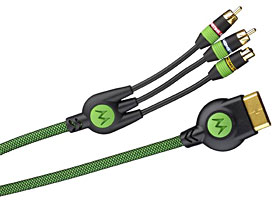
Product:
GameLink� 300 X S-Video AV Cable
Company: Monster Cable
Website:
http://www.monstercable.com/monstergame/xbox/default.html
Estimated Street Price: $44.95
Review By: Byron Hinson
The Features
If you have just paid out 300 dollars for your Xbox and have a good Television capable of taking any type of signal better than the default in-box composite cables, you will be doing yourself a disservice by sticking with them. Why? Well there is no doubt that the Xbox has some fantastic video-output and using an S-Video, Scart or HDTV connection depending on what your Television can take, you will get a much clearer, cleaner picture. The GameLink 300 S-Video AV Cable does just that and a whole lot more. Here are some of the features:
- The Most Future-Generation Video
Game Console Requires Advanced Cable Technology
With its 250MHz GPU drawing 125 million polygons/second, a 733MHz Intel Processor and an audio processor that will support 256 stereo voices, 3D audio, and Dolby AC3 encoding, XBOX� unleashes the most powerful gaming experiences ever in a mind-blowing fusion of fantasy and reality. - Monster S-Video Maximizes 3D Game
Graphics and DVD Movie Picture
S-Video is the preferred high performance connection, because it sends the video signal in separate Chrominance (color) and Luminance (brightness) channels, for a picture that is richer in color, brighter and sharper. It also gets rid of "dot crawl", the annoying, flickering along object edges. GameLink� 300 X uses advanced technologies like nitrogen gas to ensure the best S-Video signal possible. - Monster's Advanced Audio Technology
Outperforms Ordinary Component Video and Audio Cables
GameLink has patented cable technologies that allow you to maximize the full sonic performance of your XBOX. DoubleHelix� construction and Bandwidth Balanced� multiple gauge wire networks combine to reject interference and deliver accurate reproduction of dialogue, sound effects, and music. GameLink is also equipped with a digital audio output jack, it's easy to upgrade to Dolby Digital Surround Sound. LighWave� 100X(sold separately), Monster's highest performance fiber optic audio hookup, completes the upgrade to a pure digital audio connection. - Maximize Your Gaming and Movie
Investment
You've already invested in the most killer video game system around. Why not play with the best picture and sound possible? With Monster GameLink, you'll get all the power and performance your XBOX was designed to deliver.
Installation and Settings
| Review Quotes | ||||
 |
"The 300 X S-Video cable looks quite different to your ordinary Xbox composite cables, these ones are wrapped up in heavy duty shielding" |
|
||
|
|
||||
If you already have you Xbox composite connectors attached to your Television and Xbox, just switch off the Xbox, remove them and then plug in the S-Video cable from the Xbox to the Television's s-video connector on either the front (most Television's) or back of your television. The cable also has a digital output jack which means you can start to use Dolby Digital 5.1 surround sound if you have speakers and amp capable of it.
Next you boot up your Xbox and then go into the settings menu to change your sound setup if you have speakers capable of Dolby 5.1, if you don't, then the Xbox is all ready for you to use right away.
The Cable Itself
The 300 X S-Video cable looks quite different to your ordinary Xbox composite cables, these ones are wrapped up in heavy duty shielding, and with their green covering they look great. The Another benefit is just how long the cable is, around 10 foot in length. This helps give you a bit of leeway as to where you will place your Xbox in your room. So how much of a difference does the cable actually make?
For those of you who have a 4:3 Television I have to say you won't notice TOO much of a difference when using the S-Video connection, I have done various tests with both a 4:3 and a 16:9 28" widescreen Television. The most noticeable difference out of them both was, as expected with my widescreen Television. The whole picture becomes brighter and the flickering text you get with composite cables has almost gone. I have a lot of equipment in my room and various bits and pieces like my PC next to my Television can cause some interference with most cables I use with my DVD players and my Xbox, I can say though that I did not notice any interference when using the 300 X S-Video AV cable.
So does it make enough of a difference to switch from composite cables to the new S-Video ones? If you have a Widescreen Television or a high quality 4:3 Television then I have to say yes because otherwise you are doing the Xbox an injustice by lowering the quality of the picture that we all know the Xbox can display. But the main difference you will notice is going from composite to S-Video on a Widescreen setup.
Final Comments
| How It Grades | ||||
|
|
Ease Of Use: 93% Design: 91% Manual: 78% Installation: 93% Price: 81% Overall: 89% |
|
||
|
|
||||
The cable is one of the best you can get right now for the Xbox (other than the obvious HDTV pack if you have one of those televisions). I'm not sure that I can tell you that you must go out and buy one for a 4:3 television as I couldn't notice enough difference on our test one to warrant paying out that price for it, but with a Widescreen television you simply must get an S-Video cable if you don't have access to Scart RGB or HDTV and you can't go wrong with this cable from Monster Cables.
| Specs & Package | |
| Overall Score | 89% |
| Version Reviewed | GameLink� 300 X S-Video AV Cable |
| Release Date | Out Now |
| In The Box? |
1
GameLink� 300 X S-Video AV Cable 1 Set Of Instructions |
| The Good Points |
Great Picture Great Sound Long Length |
| The Bad Points | Expensive |


