
 |

|
| ActiveWin: Reviews | Active Network | New Reviews | Old Reviews | Interviews |Mailing List | Forums |
|
|
|
|
|
DirectX |
|
ActiveMac |
|
Downloads |
|
Forums |
|
Interviews |
|
News |
|
MS Games & Hardware |
|
Reviews |
|
Support Center |
|
Windows 2000 |
|
Windows Me |
|
Windows Server 2003 |
|
Windows Vista |
|
Windows XP |
|
|
|
|
|
|
|
News Centers |
|
Windows/Microsoft |
|
DVD |
|
Apple/Mac |
|
Xbox |
|
News Search |
|
|
|
|
|
|
|
ActiveXBox |
|
Xbox News |
|
Box Shots |
|
Inside The Xbox |
|
Released Titles |
|
Announced Titles |
|
Screenshots/Videos |
|
History Of The Xbox |
|
Links |
|
Forum |
|
FAQ |
|
|
|
|
|
|
|
Windows XP |
|
Introduction |
|
System Requirements |
|
Home Features |
|
Pro Features |
|
Upgrade Checklists |
|
History |
|
FAQ |
|
Links |
|
TopTechTips |
|
|
|
|
|
|
|
FAQ's |
|
Windows Vista |
|
Windows 98/98 SE |
|
Windows 2000 |
|
Windows Me |
|
Windows Server 2002 |
|
Windows "Whistler" XP |
|
Windows CE |
|
Internet Explorer 6 |
|
Internet Explorer 5 |
|
Xbox |
|
Xbox 360 |
|
DirectX |
|
DVD's |
|
|
|
|
|
|
|
TopTechTips |
|
Registry Tips |
|
Windows 95/98 |
|
Windows 2000 |
|
Internet Explorer 5 |
|
Program Tips |
|
Easter Eggs |
|
Hardware |
|
DVD |
|
|
|
|
|
|
|
ActiveDVD |
|
DVD News |
|
DVD Forum |
|
Glossary |
|
Tips |
|
Articles |
|
Reviews |
|
News Archive |
|
Links |
|
Drivers |
|
|
|
|
|
|
|
Latest Reviews |
|
Xbox/Games |
|
Fallout 3 |
|
|
|
Applications |
|
Windows Server 2008 R2 |
|
Windows 7 |
|
|
|
Hardware |
|
iPod Touch 32GB |
|
|
|
|
|
|
|
Latest Interviews |
|
Steve Ballmer |
|
Jim Allchin |
|
|
|
|
|
|
|
Site News/Info |
|
About This Site |
|
Affiliates |
|
Contact Us |
|
Default Home Page |
|
Link To Us |
|
Links |
|
News Archive |
|
Site Search |
|
Awards |
|
|
|
|
|
|
|
Credits |




|
Product: Arc Touch Mouse |
Every so often, Microsoft releases a
product that combines high tech, stylish design with something very
functional that would be a pleasure to add to your desktop. Think of the
special Phillippe Starck mice, several years ago and more recently the
Microsoft Arc Mouse and Arc Keyboard. To compliment the Arc series,
Microsoft has now released the Arc Touch, a high-tech, ultra mobile and
convenient mouse. Is it a worthy addition? Read on to find out.
Features
-
Flexible Design
Curve for comfort, flatten to pack. A perfect fit for your hand�and your mobile lifestyle. -
Power On and Off
Curve to turn on. Flatten to turn off. No button to switch. A green light flashes to show the battery is working, and then turns off to save battery life. -
Touch to Scroll
Click. Tap. Flick. Control. -
BlueTrack Technology�
Works on difficult surfaces1�rough glossy, or soft. -
2.4 GHz�30-Foot Wireless Range
The 2.4 GHz wireless USB Nano Transceiver connects wirelessly right out of the box with virtually no interference and has up to a 30-foot wireless range. -
Snap-in Transceiver
Nano Transceiver snaps into the bottom of the mouse. -
Comfort for Either Hand
Use your mouse with your left or right hand. -
Device Stage
Quickly and easily access common tasks, including product information, registration, settings. -
Up to 6 Months of Battery Life
Setup & Installation
The mouse setup with Windows 7 could not be easier. Simply insert the transceiver, put in the two AAA Energizer batteries (included), and The IntelliPoint 8.0 software is automatically loaded and within seconds the mouse is ready to use. Upon first use, there is a windows that appears to optionally direct you to Microsoft's site, arctouchmouse.com, for additional information. If possible, check the site out, there are some cool videos on design and more.


Mouse Design &
Use
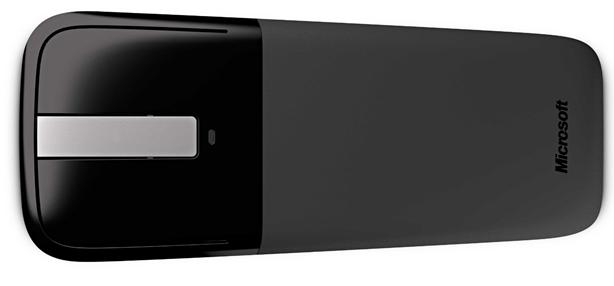
The mouse has a very compact design, about 5.14 inches long, 2.25 inches wide, and only about 1/2 inch at its thickest point. The front part of the mouse is a high quality, high gloss plastic, with two silver matte buttons in the middle. At the bottom of the buttons, is a green indicator light that lights when first turned on. I think four total buttons are just fine for the mobile user, but this is robust enough for everyday desktop use.
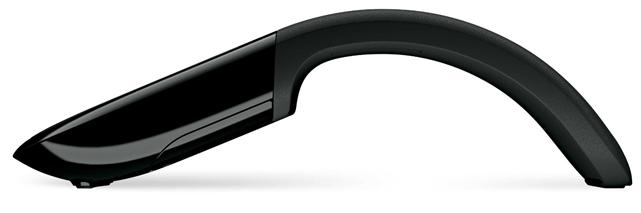
The bottom half of the mouse is a very soft rubber material. The battery
compartment is in the top, the thickest part. Out of the box, the mouse
is flat, once the batteries are in you have to fold from top to bottom to
put the mouse into position. One very cool thing, since the mouse does not
have an on/off switch, when the mouse is in the "flat" position, it is
automatically turned off. There is a piece of of gloss plastic on the bottom
tip of the mouse so you have a nice "smooth" experience.

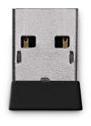
I was almost afraid at first put the mouse into position, I thought I was going to break it! The USB transceiver (Microsoft version 3.1) is the smallest I have ever seen, and is literally the silver USB tip plus less than 1/4 inch of plastic, and is sturdy and should probably be left in all the time on your laptop or desktop PC. However, another cool feature is if you do not want to leave it in, on the underside of the mouse there is a built in magnet and an indicator on the plastic where you place the transceiver, which stays nicely in place! Nice touch, no pun intended. Microsoft's optical technology of course is great and the laser light is blue, and works very well after many years of testing (Microsoft's BlueTrack technology). One final thing of note, when you are using the mouse, to scroll put your fingers on the center buttons - when you move up or down with your finger, you hear a slight scrolling sound...probably the first ever speaker in the mouse! It is a very slight sound, hardly noticeable, but I am not sure if you can turn it off.
Final Comments
| How It Grades |
|
Installation:
100% |
I think this mouse is a great addition
for a mobile or desktop user. It is compact, and small enough to be easily
placed in a laptop bag, but the mouse is still full size for every-day
desktop use. The design alone is worth the investment, I think. Some people
say that the mouse is a little stiff, or the buttons are too hard to click,
but I didn't notice any problems using it. I think it would have been nice
to include a little travel sleeve or something. If you want a little more
full design, for heavier use, I'd try the regular Microsoft Arc Mouse,
otherwise, I would definitely recommend the Microsoft Arc Touch mouse as
your next mouse purchase.
| Specs & Package | |
| Overall Score | 94.75% |
| Version Reviewed | Microsoft Arc Touch Mouse |
| Release Date | Out Now |
| The Good Points |
Smallest Transceiver Compact & Portable Design |
| The Bad Points |
A little Rigid No Case |
| In The Box |
Mouse 2 AAA Energizer Batteries 1 Set of Instructions 1 Transceiver |
| Similar Product | Microsoft Arc Mouse |
| System Requirements | Requires a PC that meets the requirements for and has installed one of these operating systems: Windows� 7, Windows Vista� , Windows� XP |


