
 |

|
| ActiveWin: Reviews | Active Network | New Reviews | Old Reviews | Interviews |Mailing List | Forums |
|
|
|
|
|
DirectX |
|
ActiveMac |
|
Downloads |
|
Forums |
|
Interviews |
|
News |
|
MS Games & Hardware |
|
Reviews |
|
Support Center |
|
Windows 2000 |
|
Windows Me |
|
Windows Server 2003 |
|
Windows Vista |
|
Windows XP |
|
|
|
|
|
|
|
News Centers |
|
Windows/Microsoft |
|
DVD |
|
Apple/Mac |
|
Xbox |
|
News Search |
|
|
|
|
|
|
|
ActiveXBox |
|
Xbox News |
|
Box Shots |
|
Inside The Xbox |
|
Released Titles |
|
Announced Titles |
|
Screenshots/Videos |
|
History Of The Xbox |
|
Links |
|
Forum |
|
FAQ |
|
|
|
|
|
|
|
Windows XP |
|
Introduction |
|
System Requirements |
|
Home Features |
|
Pro Features |
|
Upgrade Checklists |
|
History |
|
FAQ |
|
Links |
|
TopTechTips |
|
|
|
|
|
|
|
FAQ's |
|
Windows Vista |
|
Windows 98/98 SE |
|
Windows 2000 |
|
Windows Me |
|
Windows Server 2002 |
|
Windows "Whistler" XP |
|
Windows CE |
|
Internet Explorer 6 |
|
Internet Explorer 5 |
|
Xbox |
|
Xbox 360 |
|
DirectX |
|
DVD's |
|
|
|
|
|
|
|
TopTechTips |
|
Registry Tips |
|
Windows 95/98 |
|
Windows 2000 |
|
Internet Explorer 5 |
|
Program Tips |
|
Easter Eggs |
|
Hardware |
|
DVD |
|
|
|
|
|
|
|
ActiveDVD |
|
DVD News |
|
DVD Forum |
|
Glossary |
|
Tips |
|
Articles |
|
Reviews |
|
News Archive |
|
Links |
|
Drivers |
|
|
|
|
|
|
|
Latest Reviews |
|
Xbox/Games |
|
Fallout 3 |
|
|
|
Applications |
|
Windows Server 2008 R2 |
|
Windows 7 |
|
|
|
Hardware |
|
iPod Touch 32GB |
|
|
|
|
|
|
|
Latest Interviews |
|
Steve Ballmer |
|
Jim Allchin |
|
|
|
|
|
|
|
Site News/Info |
|
About This Site |
|
Affiliates |
|
Contact Us |
|
Default Home Page |
|
Link To Us |
|
Links |
|
News Archive |
|
Site Search |
|
Awards |
|
|
|
|
|
|
|
Credits |




|
Product: Logitech's Cordless Optical Mouse for Notebooks |
Here's the mouse designed from the ground up for people on the go. Logitech's Cordless Optical Mouse for Notebooks expertly combines an elegant, compact shape with the advanced features that mobile warriors require. With its convenient carrying case, it's easy to pack it up and take it anywhere. When you're ready to use it, just pop the sleek USB receiver into your notebook and start pointing, clicking, and scrolling. Logitech's Fast RF cordless technology delivers all the convenience and freedom of cordless, with no compromise in performance. And because it's optical, you can use it on almost any flat surface and never clean a mouse ball ever again.
-
Portability: Take this compact mouse anywhere and store it in the carrying case when not in use
-
Freedom: Logitech's Fast RF technology means cordless without compromise
-
Convenience: Enjoy smooth operation thanks to the advanced optical sensor that doesn't require a mouse pad
-
Comfort: Use it with either hand
-
Compact size is easy to toss into a briefcase but comfortable enough to use as your regular mouse
-
The small, sleek USB receiver plugs easily into your notebook
-
Fast RF cordless technology delivers the responsiveness and accuracy of a corded device... but without the clutter
-
Advanced optical sensor provides smooth, trouble-free operation... no mousepad required
-
On/off switch maximizes battery life
-
Comes with three pre-programmed buttons, or customize them yourself with Logitech MouseWare� software
-
Five-year limited hardware warranty
Setup & Installation
The setup of this mouse is extremely simple; just plug the USB Receiver into a USB port, do a quick software setup and you are ready to go. This mouse also supports Macintosh 8.6 or later.
Mouse Design
Logitech Cordless Optical Mouse for Notebooks is available in the variety of colors. The mouse is fairly small, sizing up at 4 inches long, 2 inches wide and an inch high. The mouse has a silver finish around the top, with a sleek black design on the bottom. The black has a very "tech" feel, it is very subtle and appeasing to look at. As you can see in the image below, there is a nice silver " Logitech" logo on the front of the mouse with sleek styling. And with Logitech's Fast RF cordless technology, it delivers all the convenience and freedom of cordless, with no compromise in performance.
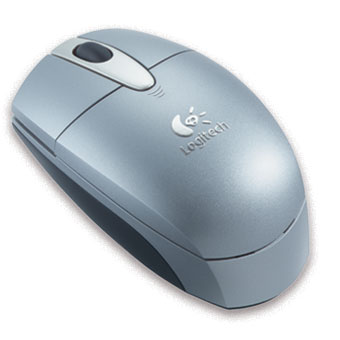
Logitech Cordless Optical Mouse has two buttons and a scroll wheel (which also services as a button), so if you depend on a ton of programmable buttons this one has 30of the most common applications available. The scroll wheel is solid black slightly raised above the two buttons. The wheel has a nice tight grip to it. The Logitech Cordless Optical Mouse is ambidextrous, so not only right hand users will prefer to use this model, lefties will also benefit from this as well. The size makes this mouse easy to use for long periods of times, without irritating the wrist (something I particularly find important). The package come with a small carrying pouch to transport the mouse and USB connector as seen below

Final Comments
| How It Grades |
|
Installation:
100% |
It is disappointing that this mouse does not have any extra buttons other than your regular two on the top. The Logitech Cordless Optical Mouse is very stylish and comes in 4 color choices. And for a wireless product this mouse has quite a range and I would strongly recommend this to anyone with a laptop. The mouse scroll button has over 30 settings so it has an option for most any user.
| Specs & Package | |
| Overall Score | 94.25% |
| Version Reviewed | Logitech's Cordless Optical Mouse for Notebooks |
| Release Date | Out Now |
| The Good Points |
USB Notebook Size Colors - Red - Blue - Black - Grey Scroll Wheel |
| The Bad Points | Could Use More Buttons / Features |
| Similar Product |
Wireless IntelliMouse� Explorer Wireless Optical Mouse |
| System Requirements |
Windows� 98, 2000, Me, XP USB port CD-ROM drive Macintosh� system Macintosh 8.6 or later |


