
 |

|
| ActiveWin: Reviews | Active Network | New Reviews | Old Reviews | Interviews |Mailing List | Forums |
|
|
|
|
|
DirectX |
|
ActiveMac |
|
Downloads |
|
Forums |
|
Interviews |
|
News |
|
MS Games & Hardware |
|
Reviews |
|
Support Center |
|
Windows 2000 |
|
Windows Me |
|
Windows Server 2003 |
|
Windows Vista |
|
Windows XP |
|
|
|
|
|
|
|
News Centers |
|
Windows/Microsoft |
|
DVD |
|
Apple/Mac |
|
Xbox |
|
News Search |
|
|
|
|
|
|
|
ActiveXBox |
|
Xbox News |
|
Box Shots |
|
Inside The Xbox |
|
Released Titles |
|
Announced Titles |
|
Screenshots/Videos |
|
History Of The Xbox |
|
Links |
|
Forum |
|
FAQ |
|
|
|
|
|
|
|
Windows XP |
|
Introduction |
|
System Requirements |
|
Home Features |
|
Pro Features |
|
Upgrade Checklists |
|
History |
|
FAQ |
|
Links |
|
TopTechTips |
|
|
|
|
|
|
|
FAQ's |
|
Windows Vista |
|
Windows 98/98 SE |
|
Windows 2000 |
|
Windows Me |
|
Windows Server 2002 |
|
Windows "Whistler" XP |
|
Windows CE |
|
Internet Explorer 6 |
|
Internet Explorer 5 |
|
Xbox |
|
Xbox 360 |
|
DirectX |
|
DVD's |
|
|
|
|
|
|
|
TopTechTips |
|
Registry Tips |
|
Windows 95/98 |
|
Windows 2000 |
|
Internet Explorer 5 |
|
Program Tips |
|
Easter Eggs |
|
Hardware |
|
DVD |
|
|
|
|
|
|
|
ActiveDVD |
|
DVD News |
|
DVD Forum |
|
Glossary |
|
Tips |
|
Articles |
|
Reviews |
|
News Archive |
|
Links |
|
Drivers |
|
|
|
|
|
|
|
Latest Reviews |
|
Xbox/Games |
|
Fallout 3 |
|
|
|
Applications |
|
Windows Server 2008 R2 |
|
Windows 7 |
|
|
|
Hardware |
|
iPod Touch 32GB |
|
|
|
|
|
|
|
Latest Interviews |
|
Steve Ballmer |
|
Jim Allchin |
|
|
|
|
|
|
|
Site News/Info |
|
About This Site |
|
Affiliates |
|
Contact Us |
|
Default Home Page |
|
Link To Us |
|
Links |
|
News Archive |
|
Site Search |
|
Awards |
|
|
|
|
|
|
|
Credits |



|
Product: WinTasks 4 Pro |
Introduction
In this day and age, IT professionals like to know anything and everything that is going on with their computer systems. Unfortunately, Windows Task Manager does not quite cut the cake (at least for power users). LIUtilies has released WinTasks 4 Professional with the hopes to quench this need for a better process/resource management program to replace the default provided in Windows. Does this program warrant the need to replace Windows task manager? Read on to find out.
-
Number of Process currently running
-
System CPU usage
-
System memory usage
-
Total physical memory
-
CPU usage graphs for up to 24 hours
-
Memory usage graphs for up to 24 hours
-
Change the priority of one or many processes with a single click
-
Save running processes and priorities to presets to quickly restore a system state later ex: By creating a preset after rebooting and removing all unnecessary processes you can quickly and easily clean up your system and return to the initial configuration at any time.
-
User-friendly names ex: "Google - Microsoft Internet Explorer" instead of "iexplore.exe"
-
Executable with full path ex: C:\Program Files\Internet Explorer\IEXPLORE.EXE
-
Process priorities, name and numeric ex: Normal(9)
-
Number of Threads owned by a process
-
Realtime CPU usage per process
-
Realtime Memory usage per process
-
Process creation times - Sort process by creation time to find new processes more easily
-
Descriptions on many common processes ex: spoolsv.exe -> Windows spooler (Printer job handling) (cannot be modified in NT/2000/XP, owned by system)
-
Editable process names - By simply editing the name of a process you can assign your own names to common processes
-
User notes per process
-
CPU usage graphs per process for up to 24 hours - Can be used to optimize applications
-
Memory usage graphs per process for up to 24 hours - Can be used to find memory leaks
-
Process Log shows all started and stopped processes
-
Show one or many invisible windows owned by the selected process
-
Hide one or many windows owned by the selected process
-
Visibillity - Tells you whether a specific window is visible or hidden
-
Window Log shows all created and removed windows
-
DLLs used by selected process
-
DLL Log shows all loaded and unloaded DLLs
-
Disable/Enable Autostart Item - Disables/enables autostart items
-
Executable and parameters of all programs started from the registry at bootup
-
Enabled/Disabled - Tells you whether an autostart item has been temporarily disabled from WinTasks
-
Create and run any number of scripts in simultaneously in the background
-
Scripts can track process cpu and memory usage and stop or modify processes when a certain condition is meet
-
Scripts can search for a specific executable and stop or modify any processes that match the criterias
-
Scripts can search for processes with a specific title ex: You could create a background scripts that automatically stops Internet Explorer when a certain website is visited
-
Scripts can start or stop processes when conditions are meet ex: You could link several programs together so that when one of them is started, the others are automatically started
Installation and Setup
Installing WinTasks 4 Professional is a breeze. Simply insert the CD, choose the installation directory and less than 30 seconds later you are all ready to go. No restart is needed. Only 10 MB of hard drive space is needed.
Basics
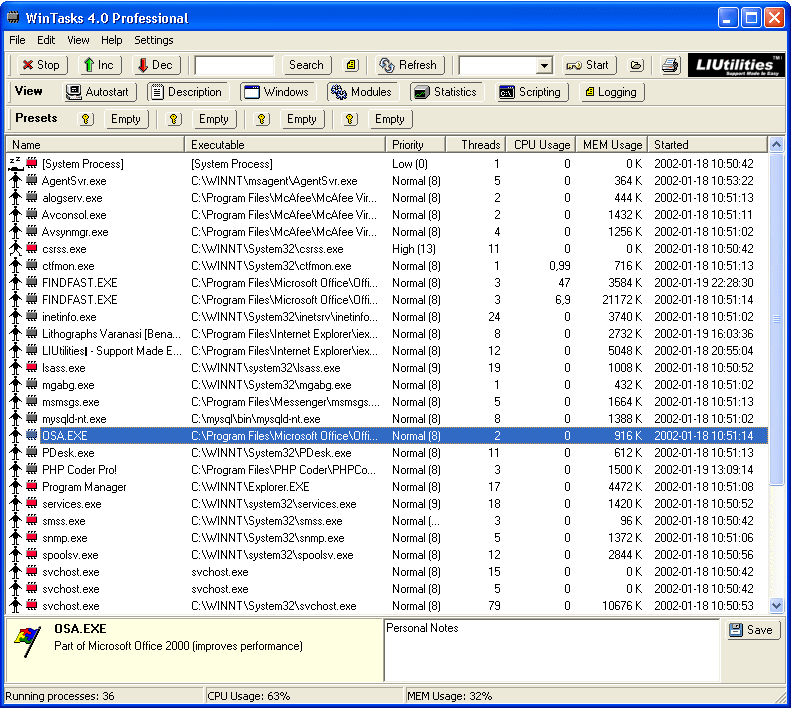
As in task manager, WinTasks focuses on the processes that run in the system. The three main types of processes are running (if it is using the CPU), blocked (if it is anticipating external action), and ready (if the process is ready to use the CPU). For each process there is a priority level in which the process accesses the CPU as compared to other processes. The process (in decreasing importance): real-time, high, above normal, normal, below normal and low. Since below and above normal are only supported in Windows 2000 and XP (and the program works on 95/98/Me as well), they are not supported in this program.
Interface and General Features
There is a lot of information to display so the interface might be overwhelming at first glance. Fortunately, you can customize the columns, taskbars, etc. Under the name column, there are two icons and the name of the process in that row. The first icon shows the priority level, and the second shows the criticalness of the process to the operation of the system (red or black). You can add your own description to the process (you can also restore it to the original if needed). The subsequent columns show executable location, priority level, threads, CPU usage, memory usage, and the time the process started.
The default buttons across the top give the options to stop processes, increase or decrease priority level, search function, refresh information, start process box, and print.
Additional Features
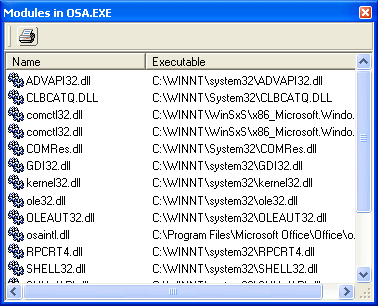
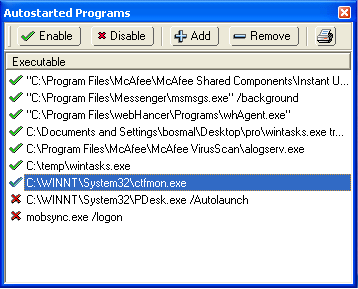
In the Autostart sub window, you can enable, disable, add and remove processes that automatically start when Windows initiates. This feature is always handy for spyware programs which uninvitingly add process to startup. In the �Windows� window you can see all the windows for a chosen process. Also from here you can see if the windows are invisible, active, etc. In the modules window you can see the DLL�s associated with a given process.
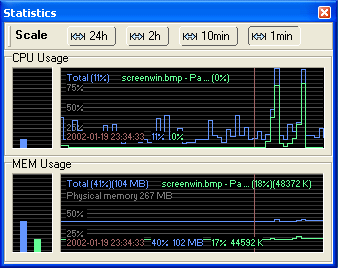
As in the task manager, statistics are important. From here you can see the CPU and memory usage over the last 1 minute, 10 minutes, 2 hours and 24 hours. In the log window, you can log all information about programs that have been started and stopped in your system.
Additional Features
This feature is definitely for power users. Here, you can create new functions and automate the behavior of processes, resources, etc.
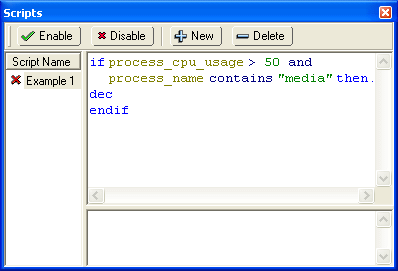
Here is an example of a script provided by the developer to decrease the priority of the media player, if it uses more than 50% of the CPU or 10% of the memory:
If process_name contains
�media� and process_cpu_usage > 50 or
Process_name contains �media� and process_mem_usage > 10 then
Alert �Media player priority decreased�
Endif
You have to be careful while using this feature, as you can definitely screw things up pretty badly. Do not worry if you do not know how to write scripts, however, as the developer provides a free online library full of them.
Final Comments
| How It Grades |
| Ease Of Use:
82% Interface: 86% Manual: 95% Cost: 82% Features: 95% Overall: 88% |
WinTasks 4 Professional provides an efficient and powerful utility to manage your systems� processes and resources. The program is much more cost effective in the online version than the boxed version, as the user�s manual is also available online. Although a little overwhelming at first, the program is easily customizable to show only the functions and information you need. In addition, LIUtilities provides a great website for support, updates, etc. I definitely recommend this program to power users, though normal users do not need this much advanced functionality.
| Specs & Package | |
| Overall Score | 88% |
| Version Reviewed | WinTasks 4 Pro |
| Release Date | Out Now |
| In The Box? | Manual |
| The Good Points |
Great Support Nice Features Powerful |
| The Bad Points |
A little overwhelming at first Do not like some of the icons Boxed version not worth the extra $$ Some features don't work on XP/2000 |
| Reviewers PC Setup |
AMD Athlon XP 2100 Asus A7V333 Motherboard 512MB DDR PC2100 Leadtek NvidiaGeForce 4 Ti 4600 Creative Labs Audigy Sound Card (OEM) 100 GB Western Digital Hard Drive 7200 RPM, 8mb Cache Samsung 16x DVD-ROM Mirai CD-RW (40x12x48x) Creative Inspire 5.1 5300 Speakers |
| PC Required |
Windows 95/98/ME/2000/XP Pentium 250 MHz 32 MB Ram 10 MB HD Space |


