
 |

|
| ActiveWin: Reviews | Active Network | New Reviews | Old Reviews | Interviews |Mailing List | Forums |
|
|
|
|
|
DirectX |
|
ActiveMac |
|
Downloads |
|
Forums |
|
Interviews |
|
News |
|
MS Games & Hardware |
|
Reviews |
|
Support Center |
|
Windows 2000 |
|
Windows Me |
|
Windows Server 2003 |
|
Windows Vista |
|
Windows XP |
|
|
|
|
|
|
|
News Centers |
|
Windows/Microsoft |
|
DVD |
|
Apple/Mac |
|
Xbox |
|
News Search |
|
|
|
|
|
|
|
ActiveXBox |
|
Xbox News |
|
Box Shots |
|
Inside The Xbox |
|
Released Titles |
|
Announced Titles |
|
Screenshots/Videos |
|
History Of The Xbox |
|
Links |
|
Forum |
|
FAQ |
|
|
|
|
|
|
|
Windows XP |
|
Introduction |
|
System Requirements |
|
Home Features |
|
Pro Features |
|
Upgrade Checklists |
|
History |
|
FAQ |
|
Links |
|
TopTechTips |
|
|
|
|
|
|
|
FAQ's |
|
Windows Vista |
|
Windows 98/98 SE |
|
Windows 2000 |
|
Windows Me |
|
Windows Server 2002 |
|
Windows "Whistler" XP |
|
Windows CE |
|
Internet Explorer 6 |
|
Internet Explorer 5 |
|
Xbox |
|
Xbox 360 |
|
DirectX |
|
DVD's |
|
|
|
|
|
|
|
TopTechTips |
|
Registry Tips |
|
Windows 95/98 |
|
Windows 2000 |
|
Internet Explorer 5 |
|
Program Tips |
|
Easter Eggs |
|
Hardware |
|
DVD |
|
|
|
|
|
|
|
ActiveDVD |
|
DVD News |
|
DVD Forum |
|
Glossary |
|
Tips |
|
Articles |
|
Reviews |
|
News Archive |
|
Links |
|
Drivers |
|
|
|
|
|
|
|
Latest Reviews |
|
Xbox/Games |
|
Fallout 3 |
|
|
|
Applications |
|
Windows Server 2008 R2 |
|
Windows 7 |
|
|
|
Hardware |
|
iPod Touch 32GB |
|
|
|
|
|
|
|
Latest Interviews |
|
Steve Ballmer |
|
Jim Allchin |
|
|
|
|
|
|
|
Site News/Info |
|
About This Site |
|
Affiliates |
|
Contact Us |
|
Default Home Page |
|
Link To Us |
|
Links |
|
News Archive |
|
Site Search |
|
Awards |
|
|
|
|
|
|
|
Credits |



 |
Product:
SideWinder Strategic Commander
Company: Microsoft
Website: http://www.microsoft.com/sidewinder
Estimated Street Price: $64.95
Review By: Julien JAY
Introduction
|
Table Of Contents |
It�s now a ritual: at each year�s end Microsoft
releases new gaming devices that fall perfectly in time with the Christmas
season.
Features List
Here are the key features of the futuristic SideWinder
Strategic Commander unit:
- Program up to 72 commands: From simple to advanced competitive profiles, Strategic Commander can accommodate all styles of game play
- Unprecedented Versatility: With record-on-the-fly, program what you need without ever leaving the game!
- Custom Game Profiles: Try one of over 30 pre-programmed profiles for your favorite strategy games or create, edit, and share your own.
- Rotating Axis Control: Intuitive map control that makes even 3D games a breeze to navigate.
- Award Winning SideWinder Controller Software to tweak your device fingers in the nose.
-
USB connection for fast & easy setup.
Setup
Installing the SideWinder Strategic Commander on your
PC is a breeze. Personally I placed it to the left of my keyboard and
plugged it to the USB port of my Microsoft Natural Keyboard Pro. The
device was instantly recognized by Windows Me. Then I inserted the drivers
CD to enjoy the benefits of the high quality Microsoft drivers. The setup
program of the drivers looks like the one of the SideWinder GameVoice and
is built around the Microsoft Windows Installer Technology. Each step is
clearly explained and the full driver set is installed in two minutes. At
the end of the setup a small video is launched in order to present you
this device that�ll change the way you�re playing strategic games. When
the setup is finished you�ll notice a new SideWinder Strategic Commander
icon on your desktop. This icon is obviously intended to launch the
SideWinder Strategic Commander configuration application we�ll review
later.
Design
The Strategic Commander unit is in fact composed of two
parts: the stationery bottom one is the base where the moving pad is attached.
The base features two buttons: the slider lets you select up to three different
game profiles while the rec button is intended to record on the fly actions
shortcuts without leaving your games. The second part is obviously the moving
pad. The pad�s exclusive design will perfectly hug the form of your hand and
you�ll be able to rest your hand comfortably on it. When you put your hand on it
the little finger rests on a dedicated curve, the ring, major and index fingers
reach the six programmable buttons (that
are near to the Zoom ones) while the thumb commands the third shift buttons
located on the right part of the pad that allow to change actual combination.
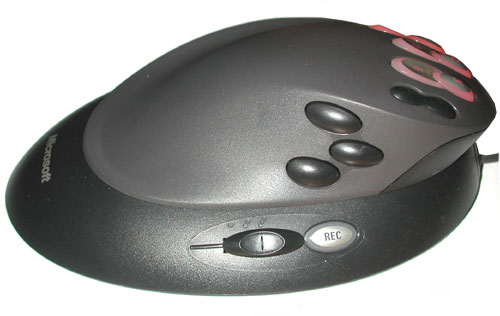
Microsoft
SideWinder Strategic Commander Profile view (c) Julien JAY 2000
| Buttons, Navigation, Drivers & Game Tests --> |


