
 |

|
| ActiveWin: Reviews | Active Network | New Reviews | Old Reviews | Interviews |Mailing List | Forums |
|
|
|
|
|
DirectX |
|
ActiveMac |
|
Downloads |
|
Forums |
|
Interviews |
|
News |
|
MS Games & Hardware |
|
Reviews |
|
Support Center |
|
Windows 2000 |
|
Windows Me |
|
Windows Server 2003 |
|
Windows Vista |
|
Windows XP |
|
|
|
|
|
|
|
News Centers |
|
Windows/Microsoft |
|
DVD |
|
Apple/Mac |
|
Xbox |
|
News Search |
|
|
|
|
|
|
|
ActiveXBox |
|
Xbox News |
|
Box Shots |
|
Inside The Xbox |
|
Released Titles |
|
Announced Titles |
|
Screenshots/Videos |
|
History Of The Xbox |
|
Links |
|
Forum |
|
FAQ |
|
|
|
|
|
|
|
Windows XP |
|
Introduction |
|
System Requirements |
|
Home Features |
|
Pro Features |
|
Upgrade Checklists |
|
History |
|
FAQ |
|
Links |
|
TopTechTips |
|
|
|
|
|
|
|
FAQ's |
|
Windows Vista |
|
Windows 98/98 SE |
|
Windows 2000 |
|
Windows Me |
|
Windows Server 2002 |
|
Windows "Whistler" XP |
|
Windows CE |
|
Internet Explorer 6 |
|
Internet Explorer 5 |
|
Xbox |
|
Xbox 360 |
|
DirectX |
|
DVD's |
|
|
|
|
|
|
|
TopTechTips |
|
Registry Tips |
|
Windows 95/98 |
|
Windows 2000 |
|
Internet Explorer 5 |
|
Program Tips |
|
Easter Eggs |
|
Hardware |
|
DVD |
|
|
|
|
|
|
|
ActiveDVD |
|
DVD News |
|
DVD Forum |
|
Glossary |
|
Tips |
|
Articles |
|
Reviews |
|
News Archive |
|
Links |
|
Drivers |
|
|
|
|
|
|
|
Latest Reviews |
|
Xbox/Games |
|
Fallout 3 |
|
|
|
Applications |
|
Windows Server 2008 R2 |
|
Windows 7 |
|
|
|
Hardware |
|
iPod Touch 32GB |
|
|
|
|
|
|
|
Latest Interviews |
|
Steve Ballmer |
|
Jim Allchin |
|
|
|
|
|
|
|
Site News/Info |
|
About This Site |
|
Affiliates |
|
Contact Us |
|
Default Home Page |
|
Link To Us |
|
Links |
|
News Archive |
|
Site Search |
|
Awards |
|
|
|
|
|
|
|
Credits |



 |
Product:
Norton Personal FireWall 2000 2.0
Company: Symantec
Website: http://www.symantec.com
Estimated Street Price: $49.95
Review By: Julien JAY
Getting started
|
Table Of Contents |
Norton Personal Firewall 2000 2.0 is very discreet and doesn�t require a lot of concentration to be used. After installing it when you�ll reboot the computer a small Firewall earth icon appears in the tray notification area of Windows. When you double click on this icon the Norton Personal Firewall main window appears : as you can see it�s fully integrated with Norton SystemWorks 2000 due to its full support of the new Norton SymMetry technology.
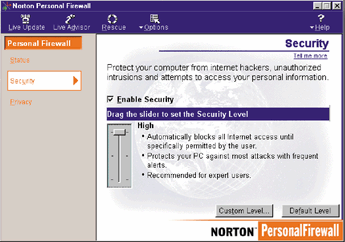
The user interface of Personal Firewall is almost clear and useful enough for all kind of users. Now you should set your privacy and security levels at your convenience. Be careful if you set this levels to High you�ll be prompted each time you visit a web site to create new firewall rules. The medium settings is best compromise between security and ease of use. Note that the privacy settings allows you to enter sensible information like your credit card number, your phone number and more to make sure this data won�t be sent on the net without your approval: so with Personal Firewall if you type on a website form your phone number an alert message will tell you that you�re about to send it over the net (notice that confidential data cannot be protected on SSL websites). The status tab of Personal Firewall reports quickly all the blocked and allowed information that Personal Firewall monitors for every category. A click on the arrow next to each category will show you exactly what was blocked or allowed.
How it works?
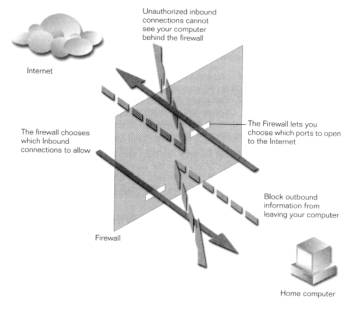
In fact Norton Personal Firewall 2000 2.0 provides a barrier, named a firewall between your computer and the Internet. It�s a filter that blocks or enable connections and data transfers in both directions. This firewall will protect users� data and privacy. Each time you visit a new website, Norton Personal Firewall will automatically create firewall rules but you can also create your own security rules.
What it does
Norton
Personal Firewall 2000 2.0 will block your privacy information that you
don�t want to share such as your email address, your postal address,
your phone number and it�ll prevent other users to give private
information without your authorization such as your Credit Card number. It
really works since for example if a website form asks you your phone
number and if you type it when NIS is running, NIS will ask you if you
want to send this confidential data.
Norton Personal Firewall can even block Cookies, but with this feature
enabled a lot of websites will refuse to work, as they require a cookie to
save users preferences� (Cookies can be better tracked with Norton
CleanSweep 2000).
Your safety is the most important thing so Norton Personal Firewall 2000
2.0 protects you from malicious internet ActiveX controls or Java applets
by monitoring them and eventually asking you if you want to run these
applets each time you visit a website that uses this technology. But once
again if this feature is enabled your Internet experience won�t be
convenient.

| <-- Introduction | Advanced Features --> |


