
 |

|
| ActiveWin: Reviews | Active Network | New Reviews | Old Reviews | Interviews |Mailing List | Forums |
|
|
|
|
|
DirectX |
|
ActiveMac |
|
Downloads |
|
Forums |
|
Interviews |
|
News |
|
MS Games & Hardware |
|
Reviews |
|
Support Center |
|
Windows 2000 |
|
Windows Me |
|
Windows Server 2003 |
|
Windows Vista |
|
Windows XP |
|
|
|
|
|
|
|
News Centers |
|
Windows/Microsoft |
|
DVD |
|
Apple/Mac |
|
Xbox |
|
News Search |
|
|
|
|
|
|
|
ActiveXBox |
|
Xbox News |
|
Box Shots |
|
Inside The Xbox |
|
Released Titles |
|
Announced Titles |
|
Screenshots/Videos |
|
History Of The Xbox |
|
Links |
|
Forum |
|
FAQ |
|
|
|
|
|
|
|
Windows XP |
|
Introduction |
|
System Requirements |
|
Home Features |
|
Pro Features |
|
Upgrade Checklists |
|
History |
|
FAQ |
|
Links |
|
TopTechTips |
|
|
|
|
|
|
|
FAQ's |
|
Windows Vista |
|
Windows 98/98 SE |
|
Windows 2000 |
|
Windows Me |
|
Windows Server 2002 |
|
Windows "Whistler" XP |
|
Windows CE |
|
Internet Explorer 6 |
|
Internet Explorer 5 |
|
Xbox |
|
Xbox 360 |
|
DirectX |
|
DVD's |
|
|
|
|
|
|
|
TopTechTips |
|
Registry Tips |
|
Windows 95/98 |
|
Windows 2000 |
|
Internet Explorer 5 |
|
Program Tips |
|
Easter Eggs |
|
Hardware |
|
DVD |
|
|
|
|
|
|
|
ActiveDVD |
|
DVD News |
|
DVD Forum |
|
Glossary |
|
Tips |
|
Articles |
|
Reviews |
|
News Archive |
|
Links |
|
Drivers |
|
|
|
|
|
|
|
Latest Reviews |
|
Xbox/Games |
|
Fallout 3 |
|
|
|
Applications |
|
Windows Server 2008 R2 |
|
Windows 7 |
|
|
|
Hardware |
|
iPod Touch 32GB |
|
|
|
|
|
|
|
Latest Interviews |
|
Steve Ballmer |
|
Jim Allchin |
|
|
|
|
|
|
|
Site News/Info |
|
About This Site |
|
Affiliates |
|
Contact Us |
|
Default Home Page |
|
Link To Us |
|
Links |
|
News Archive |
|
Site Search |
|
Awards |
|
|
|
|
|
|
|
Credits |


|
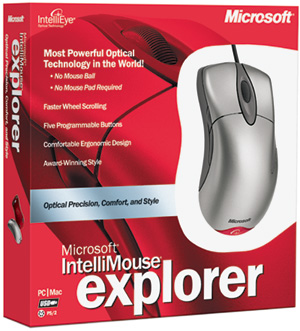
Product: IntelliMouse Explorer 3.0 |
Final Results and Overall Mark
|
Table Of Contents |
Well we have reached the end of the review. Here are my final comments, notes and grades for the Microsoft IntelliMouse Explorer 3.0.
Final Comments
| How It Grades | ||||
 |
Installation:
90% Look: 80% Optical Accuracy: 95% Performance: 90% Drivers: 85% Compatibility with existing applications: 95% Price: 90% Overall: 89% |
|
||
There�s no doubt that Microsoft IntelliMouse Explorer 3.0 is a great device. The unrivalled accuracy of its sensor combined to the outstanding IntelliPoint drivers that offer a myriad of ways to program the five buttons ensures everyone will be able to customize the mouse. The new Optical sensor is a real advance over previous generations of sensors making the mouse a must have for users that require high precision clicking like die-hard gamers or graphic designers.
The �new edge� design of the IntelliMouse Explorer 3.0 may disrupt some users, but after a few hours of use they will get used to it. The only thing I regret is that Microsoft didn�t keep this mouse as comfortable as the first IntelliMouse Explorer by keeping the same body. Nonetheless the Microsoft IntelliMouse Explorer 3.0 is a winner which we highly recommend despite its ergonomics level is clearly under the first model.
| Specs & Package | |
| Overall Score | 89% |
| Version Reviewed | Microsoft IntelliMouse Explorer 3.0 |
| Release Date | Available Now! |
| In the Box |
1 IntelliMouse Explorer 3.0 Device, 1 USB to PS/2 Adapted, 1 Drivers CD-Rom, 1 Users' Guide. |
| The Good Points |
New 6000dpi Optical Sensor, Outstanding IntelliPoint 4.0 Drivers, Fast Scrolling Wheel, 5 buttons, High accuracy and quick response. |
| The Bad Points |
Weird Design, Not as comfortable as the first IntelliMouse Explorer, Previous & Next buttons are way too small and incorrectly positionned. |
| Reviewers PC Setup |
Pentium 4 2.0 GHz |
| PC Required |
Minimum
System Requirements |


